This is an example on how to set a Host Device GPU Pass-Through on a KVM/QEMU/Libvirt Server for NVIDIA Tesla M10. You can use the following command to identify the device you want to use:
SERVER:~ # lspci | grep Tesla
19:00.0 VGA compatible controller: NVIDIA Corporation GM107GL [Tesla M10] (rev a2)
1a:00.0 VGA compatible controller: NVIDIA Corporation GM107GL [Tesla M10] (rev a2)
1b:00.0 VGA compatible controller: NVIDIA Corporation GM107GL [Tesla M10] (rev a2)
1c:00.0 VGA compatible controller: NVIDIA Corporation GM107GL [Tesla M10] (rev a2)
SERVER:~ #
As you can see from the output of the command, you will be provided with the information you need, the device ID: 19:00.0. Now, you have substitute the colon and the period with underscores like this, pci_0000_19_00_0, and you run the following virsh command:
SERVER:~ # virsh nodedev-dumpxml pci_0000_19_00_0
<device>
  <name>pci_0000_19_00_0</name>
  <path>/sys/devices/pci0000:16/0000:16:00.0/0000:17:00.0/0000:18:08.0/0000:19:00.0</path>
  <parent>pci_0000_18_08_0</parent>
  <capability type='pci'>
    <class>0x030000</class>
    <domain>0</domain>
    <bus>25</bus>
    <slot>0</slot>
    <function>0</function>
    <product id='0x13bd'>GM107GL [Tesla M10]</product>
    <vendor id='0x10de'>NVIDIA Corporation</vendor>
    <iommuGroup number='10'>
      <address domain='0x0000' bus='0x19' slot='0x00' function='0x0'/>
    </iommuGroup>
    <numa node='0'/>
    <pci-express>
      <link validity='cap' port='8' speed='8' width='16'/>
      <link validity='sta' speed='2.5' width='8'/>
    </pci-express>
  </capability>
</device>
SERVER:~ #
Now, you can generate the information to use for the KVM/QEMU/Libvirt virtual machine configuration for the remaining cores:
SERVER:~ # virsh nodedev-dumpxml pci_0000_1a_00_0
SERVER:~ # virsh nodedev-dumpxml pci_0000_1b_00_0
SERVER:~ # virsh nodedev-dumpxml pci_0000_1c_00_0
You copy the following lines form the output in a text file for later use.
<address domain='0x0000' bus='0x19' slot='0x00' function='0x0'/>
<address domain='0x0000' bus='0x1a' slot='0x00' function='0x0'/>
<address domain='0x0000' bus='0x1b' slot='0x00' function='0x0'/>
<address domain='0x0000' bus='0x1c' slot='0x00' function='0x0'/>
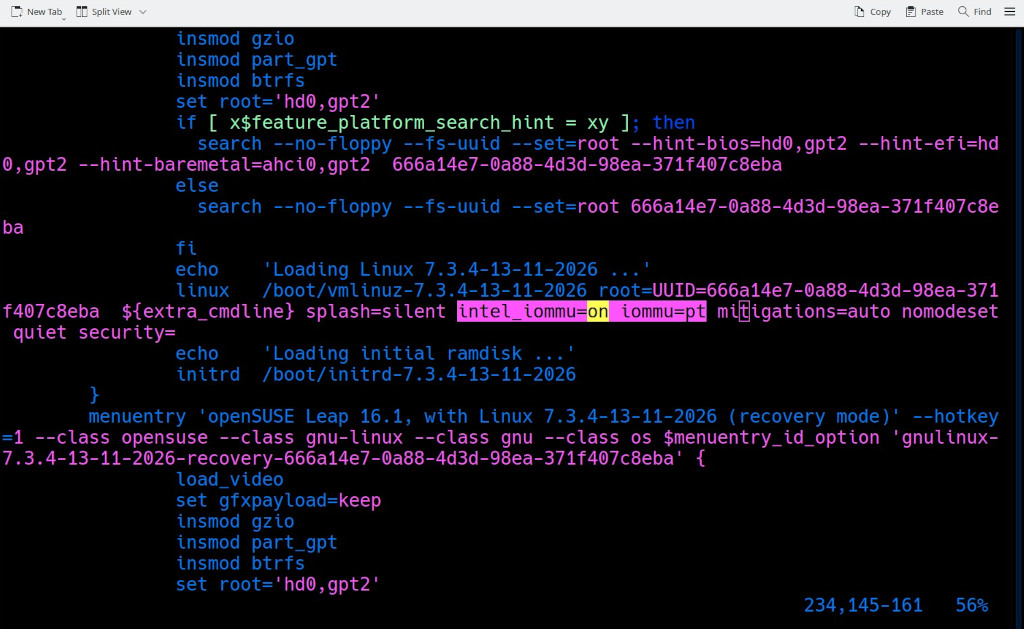
Before you proceed and to be able to detach a device, you have to add “intel_iommu=on iommu=pt” after Linux ${extra_cmdline} by editing the /boot/grub2/grub.cfg and reboot the system.
SERVER:~ # vi /boot/grub2/grub.cfg
${extra_cmdline} splash=silent intel_iommu=on iommu=pt mitigations=auto nomodeset quiet security=
SERVER:~ # reboot
To detach a device you can run the virsh nodedev-detach command:
SERVER:~ # virsh nodedev-detach pci_0000_19_00_0
Device pci_0000_19_00_0 detached
SERVER:~ # virsh nodedev-detach pci_0000_1a_00_0
Device pci_0000_1a_00_0 detached
SERVER:~ # virsh nodedev-detach pci_0000_1b_00_0
Device pci_0000_1b_00_0 detached
SERVER:~ # virsh nodedev-detach pci_0000_1c_00_0
Device pci_0000_1c_00_0 detached
SERVER:~ #
Once detached, you can run virsh edit, add the following entries and start the VM with virsh start.
SERVER:~ # virsh edit ollamasrv
<hostdev mode='subsystem' type='pci' managed='yes'>
   <source>
     <address domain='0x0000' bus='0x19' slot='0x00' function='0x0'/>
   </source>
 </hostdev>
<hostdev mode='subsystem' type='pci' managed='yes'>
   <source>
     <address domain='0x0000' bus='0x1a' slot='0x00' function='0x0'/>
   </source>
</hostdev>
<hostdev mode='subsystem' type='pci' managed='yes'>
   <source>
     <address domain='0x0000' bus='0x1b' slot='0x00' function='0x0'/>
   </source>
</hostdev>
<hostdev mode='subsystem' type='pci' managed='yes'>
   <source>
     <address domain='0x0000' bus='0x1c' slot='0x00' function='0x0'/>
   </source>
</hostdev>
SERVER:~ # virsh destroy ollamasrv
SERVER:~ # virsh start ollamasrv
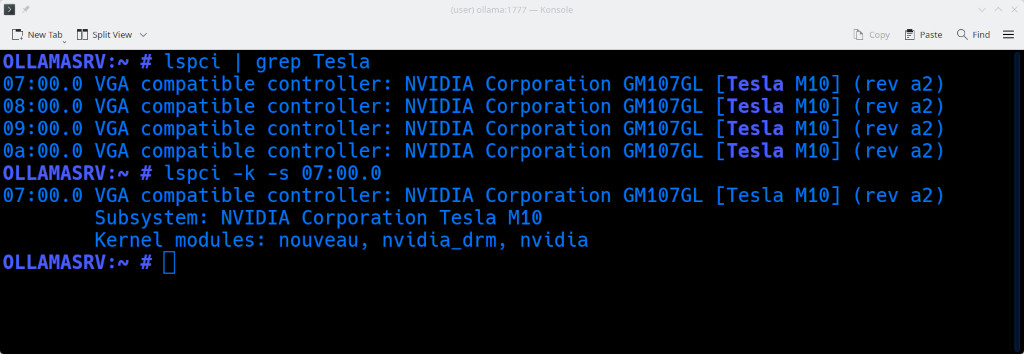
Finally, you connect to the virtual machine and check if it worked like this:
OLLAMASRV:~ # lspci | grep Tesla
07:00.0 VGA compatible controller: NVIDIA Corporation GM107GL [Tesla M10] (rev a2)
08:00.0 VGA compatible controller: NVIDIA Corporation GM107GL [Tesla M10] (rev a2)
09:00.0 VGA compatible controller: NVIDIA Corporation GM107GL [Tesla M10] (rev a2)
0a:00.0 VGA compatible controller: NVIDIA Corporation GM107GL [Tesla M10] (rev a2)
OLLAMASRV:~ # lspci -k -s 07:00.0
07:00.0 VGA compatible controller: NVIDIA Corporation GM107GL [Tesla M10] (rev a2)
        Subsystem: NVIDIA Corporation Tesla M10
        Kernel modules: nouveau, nvidia_drm, nvidia
OLLAMASRV:~ #